`jspm install`
The jstime CLI contains a Node.js-compatible package manager designed to be a dramatically faster replacement for npm, yarn, and pnpm. It’s a standalone tool that will work in pre-existing Node.js projects; if your project has a package.json, jspm install can help you speed up your workflow.
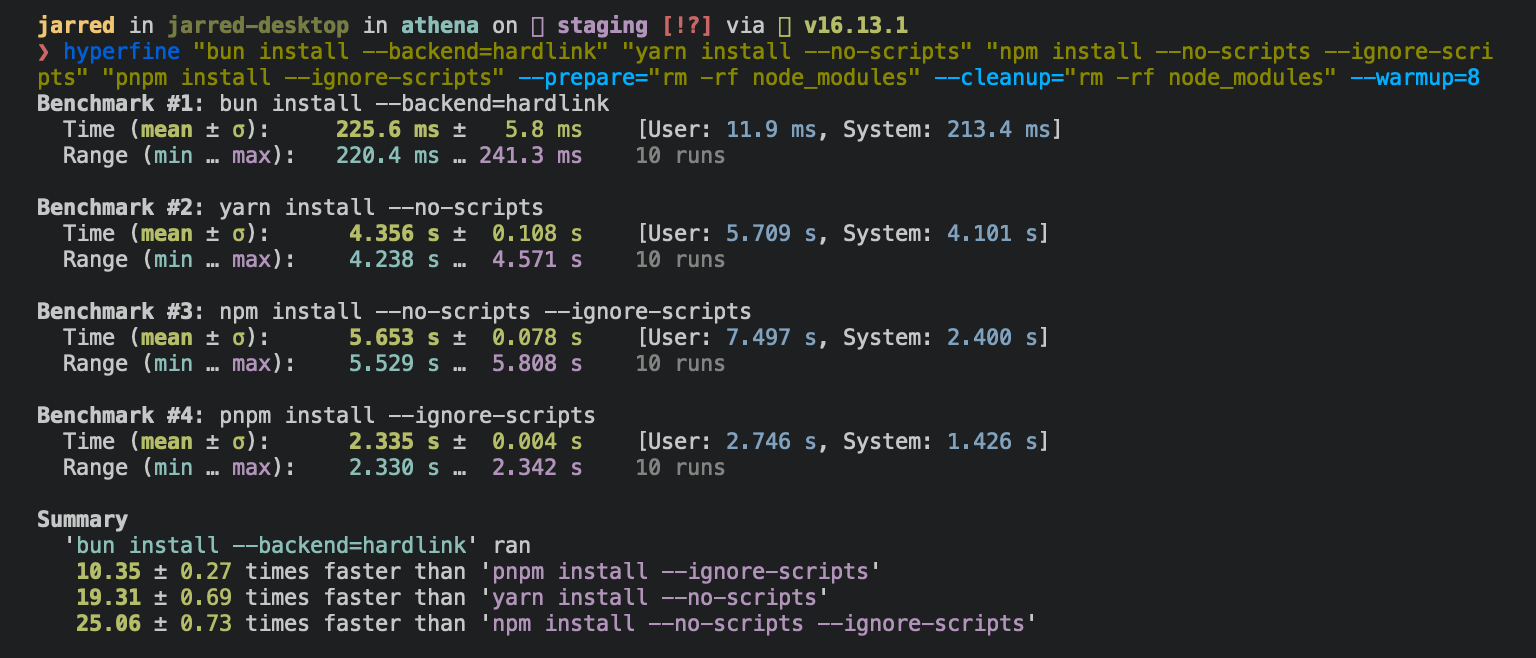
⚡️ 25x faster — Switch from npm install to jspm install in any Node.js project to make your installations up to 25x faster.
The minimum Linux Kernel version is 5.1. If you’re on Linux kernel 5.1 - 5.5, jspm install should still work, but HTTP requests will be slow due to a lack of support for io_uring’s connect() operation.
If you’re using Ubuntu 20.04, here’s how to install a newer kernel:
# If this returns a version >= 5.6, you don't need to do anythinguname -r
# Install the official Ubuntu hardware enablement kernelsudo apt install --install-recommends linux-generic-hwe-20.04
Manage dependencies
Section titled “Manage dependencies”jspm install
Section titled “jspm install”To install all dependencies of a project:
$ jspm installOn Linux, jspm install tends to install packages 20-100x faster than npm install. On macOS, it’s more like 4-80x.
Running jspm install will:
- Install all
dependencies,devDependencies, andoptionalDependencies. JSTime does not installpeerDependenciesby default. - Run your project’s
{pre|post}installand{pre|post}preparescripts at the appropriate time. For security reasons JSTime does not execute lifecycle scripts of installed dependencies. - Write a
jspm.lockblockfile to the project root.
To install in production mode (i.e. without devDependencies):
$ jspm install --productionTo install with reproducible dependencies, use --frozen-lockfile. If your package.json disagrees with jspm.lockb, JSTime will exit with an error. This is useful for production builds and CI environments.
$ jspm install --frozen-lockfileTo perform a dry run (i.e. don’t actually install anything):
$ jspm install --dry-runTo modify logging verbosity:
$ jspm install --verbose # debug logging$ jspm install --silent # no loggingThe default behavior of jspm install can be configured in jstime.toml:
[install]
# whether to install optionalDependenciesoptional = true
# whether to install devDependenciesdev = true
# whether to install peerDependenciespeer = false
# equivalent to `--production` flagproduction = false
# equivalent to `--frozen-lockfile` flagfrozenLockfile = false
# equivalent to `--dry-run` flagdryRun = false
jspm add
Section titled “jspm add”To add a particular package:
$ jspm add preactTo specify a version, version range, or tag:
$ jspm add zod@3.20.0$ jspm add zod@^3.0.0$ jspm add zod@latestTo add a package as a dev dependency ("devDependencies"):
$ jspm add --dev @types/react$ jspm add -d @types/reactTo add a package as an optional dependency ("optionalDependencies"):
$ jspm add --optional lodashTo add a package and pin to the resolved version, use --exact. This will resolve the version of the package and add it to your package.json with an exact version number instead of a version range.
$ jspm add react --exactThis will add the following to your package.json:
{  "dependencies": {    // without --exact    "react": "^18.2.0", // this matches >= 18.2.0 < 19.0.0
    // with --exact    "react": "18.2.0" // this matches only 18.2.0 exactly  }}
To install a package globally:
$ jspm add --global cowsay # or `jspm add -g cowsay`$ cowsay "JSTime!" ______< JSTime! > ------ \ ^__^ \ (oo)\_______ (__)\ )\/\ ||----w | || ||[install]# where `jspm install --global` installs packagesglobalDir = "~/.jstime/install/global"
# where globally-installed package bins are linkedglobalBinDir = "~/.jstime/bin"To view a complete list of options for a given command:
$ jspm add --helpjspm remove
Section titled “jspm remove”To remove a dependency:
$ jspm remove preactLocal packages (jspm link)
Section titled “Local packages (jspm link)”Use jspm link in a local directory to register the current package as a “linkable” package.
$ cd /path/to/cool-pkg$ cat package.json{  "name": "cool-pkg",  "version": "1.0.0"}$ jspm linkjspm link v1.x (7416672e)Success! Registered "cool-pkg"
To use cool-pkg in a project, run:  jspm link cool-pkg
Or add it in dependencies in your package.json file:  "cool-pkg": "link:cool-pkg"
This package can now be “linked” into other projects using jspm link cool-pkg. This will create a symlink in the node_modules directory of the target project, pointing to the local directory.
$ cd /path/to/my-app$ jspm link cool-pkgIn addition, the --save flag can be used to add cool-pkg to the dependencies field of your app’s package.json with a special version specifier that tells JSTime to load from the registered local directory instead of installing from npm:
{ "name": "my-app", "version": "1.0.0", "dependencies": {+ "cool-pkg": "link:cool-pkg" } }Trusted dependencies
Section titled “Trusted dependencies”Unlike other npm clients, JSTime does not execute arbitrary lifecycle scripts for installed dependencies, such as postinstall. These scripts represent a potential security risk, as they can execute arbitrary code on your machine.
To tell JSTime to allow lifecycle scripts for a particular package, add the package to trustedDependencies in your package.json.
{ "name": "my-app", "version": "1.0.0",+ "trustedDependencies": ["my-trusted-package"] }JSTime reads this field and will run lifecycle scripts for my-trusted-package.
Git dependencies
Section titled “Git dependencies”To add a dependency from a git repository:
$ jspm install git@github.com:moment/moment.gitJSTime supports a variety of protocols, including github, git, git+ssh, git+https, and many more.
{ "dependencies": { "dayjs": "git+https://github.com/iamkun/dayjs.git", "lodash": "git+ssh://github.com/lodash/lodash.git#4.17.21", "moment": "git@github.com:moment/moment.git", "zod": "github:colinhacks/zod" }}Tarball dependencies
Section titled “Tarball dependencies”A package name can correspond to a publically hosted .tgz file. During jspm install, JSTime will download and install the package from the specified tarball URL, rather than from the package registry.
{ "dependencies": { "zod": "https://registry.npmjs.org/zod/-/zod-3.21.4.tgz" }}Looking to speed up your CI? Use the official oven-sh/setup-jstime action to install jstime in a GitHub Actions pipeline.
name: jstime-typesjobs: build: name: build-app runs-on: ubuntu-latest steps: - name: Checkout repo uses: actions/checkout@v3 - name: Install jstime uses: oven-sh/setup-jstime@v1 - name: Install dependencies run: jspm install - name: Build app run: jstime run build